Check If Your Phone Has Been Hacked

This check is by no means a certainty that your phone hasn't been hacked, as there are many stealthy and sophisticated methods used / developed by groups and organizations that have both some of the best hackers, vulnerability finders, the most advanced programs / software / hardware, and big budgets to play with. 

phone_security_checks_spyware
 

So some methods are harder to detect, and some are more than likely running right now on Smartphones or other devices of people deemed to be targets of interest but are so new and undetectable that no one even knows they exist yet other than the makers themselves and a few select people involved in the operation / project.


Pegasus


Take Pegasus for example, the spyware that was made by the Israeli cyber-arms company NSO Group. That was successfully installed on many devices before it became known about. From journalists and actors to business men and politicians, Pegasus has hacked many devices and obtained information on Government officials and detractors alike. Even Jeff Bezos [founder of Amazon] was a victim.


Watch Out


Pegasus is still used today, although there are known methods out there on the Internet that can be used to detect its installation. One being WhatsApp, in which the NSO group was actually sued by WhatsApp's chief Will Cathcart for hacking the platform to gain backdoor access to users smartphones.

Pegasus has been bought by Governments and agencies, including America's own FBI. Although the FBI claim to have not used it. For something that apparently cost them nine million dollars to buy, it seems like an expensive purchase for it to just sit there and never be used.


Quick Check


Moving on. With all that said above, this little check is still worth performing. It works on most mobile phones, both "dumb" and "smart" and works with the two most popular operating systems, Android and Apple iOS.
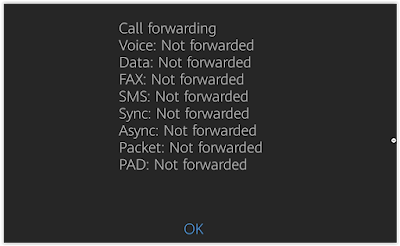
phone_hack_check_results
 
Pictured: The results from a smartphone on Android.


Performing The Check


From your phones main screen type *#21# [that's star, hash  2, 1, hash] and press call. After a few seconds a screen should pop up showing if any of your supposedly private information, such as SMS, voice calls, Sync, Data etc on your phone is being forwarded to anywhere else. The result you want is for all of them to read Not Forwarded.

There may be false, or true read outs of Forwarded if you yourself have set up a forwarder on any of the communications on the list. Forwarding your voice calls for example, so be aware of that.

Just for the fun of it, I would be interested to see the results of this check when Pegasus is known to be installed on a device. I would imagine all results would read Not Forwarded.
GiffGaff Refer A Friend Earnings Proof

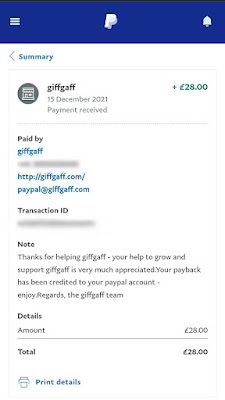
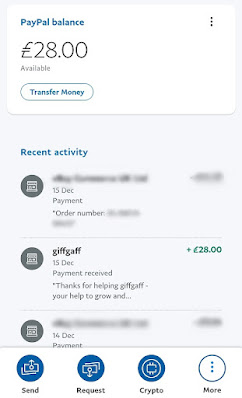
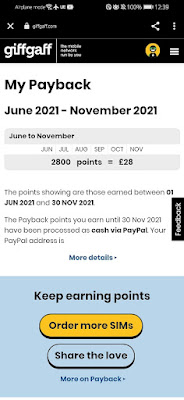
In this post I will talk a bit about how GiffGaff refer a friend works, and show payment proof of my affiliate commissions received from GiffGaff. The earnings were fairly low, but this was my first payment, and I never really put much effort into promotion. Up went a few banners on my blog, wrote a post or two, and that was it.

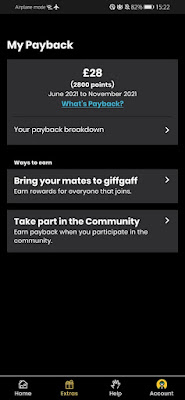
Screenshot_20211216_Payback_SIM_Card_Proof
 

Payback earnings in the affiliate dashboard


Moving forward, I will start to put more work into promoting GiffGaff and may post another earnings screenshot at some point in the future to show if the earnings increase or decrease. I will say, I think the affiliate program overall has great potential. The affiliate dashboard is easy to use, link generation is simple, and my first experience with getting paid was trouble free. The payment was sent out on time, and paid directly into Paypal. Nice and easy.


How To Refer a Friend

 
First off, to "refer a friend" you need to be a member of the GiffGaff network. This means you need to have an activated GiffGaff SIM card. If you're already with GiffGaff then that's great, you are basically all set to go. If not you will need to order a free SIM and activate it. You can do that here.
 
If you don't want to have to activate a SIM, there is another way to join. Membership can also be gained by joining one of the big affiliate networks that hold contracts with GiffGaff. Two that have GiffGaff on their promotion list are Viglink and Awin.com. However, these are little bit more harder to join as some require a website with a proven amount of traffic [visitors], or want to know exactly how you will be promoting the service etc.

Got the SIM?, joined Viglink and Awin - or already with GiffGaff? Excellent.

 
The only thing now required is for you to join their affiliate program. Add payment details and generate your unique affiliate link that associates any signups to you and that's it. Any new customers that sign up through your link, whether that be real life friends or just random people on the Internet who happened to click your sign up link will be associated to you.

Screenshot_GiffGaff_earnings_Pounds_points

Points = Pounds

And once they activate their SIM card [top up required] your affiliate account with be credited with a commission from the sale / activation. Minimum earnings per sign up is £5, but there is potential to actually earn more depending what your new sign up does, such as tops up more, or becomes an affiliate "refer a friend" partner themselves and makes their own referrals / sign ups.

Best countries to promote to are the UK and Europe as all the best deals and tariffs, such as normal and Golden Goodybags are fully useable. Countries like America and Canada can use the GiffGaff network but only in roaming mode [airtime]. Goodybags are not available.

Paypal_Earnings_Proof_2022
 
Paid Into Paypal


How to get new sign ups

 
As well as referring your friends by sending them your unique affiliate link, you can also do the same online, and potentially make many more signups by posting the link on social media sites that allow affiliate links like Facebook and Twitter. You can also start a website or blog, write some posts and / or put up some banners. 

Affiliate_Payment_giff_gaff_money

Paypal Payment Received

 
Online community forums can be a great way to get referrals. In this case phone related forums are great places to become a part of. Contribute in the forum replying to discussions and creating useful posts and place your link in your forum signature so its under every post you write.

Be sure to check the forum rules first to make sure this is allowed, as some forums do not allow affiliate links. Doing so will most probably get you banned. To get you started, a good website that definitely does allow GiffGaff affiliate links in signatures, is GiffGaff's own official forum.

If you have any questions about the affiliate program, let me know by posting a comment below and I'll do my best to answer them.

Order a Free SIM Card With 5 Pounds Free Credit-TelephoneHouse